qdo Cheatsheet
Agent-first data exploration — accumulate reusable knowledge as you inspect, profile, query, and hand off
Supports SQLite, DuckDB, Snowflake, Parquet
uv tool install '.[duckdb]'
uv tool install '.[duckdb]'
Getting Started
1
Install
uv tool install '.[duckdb]' from checkout
2
Add Connection
qdo config add --name mydb --type duckdb --path ./data.duckdb
3
Explore
qdo catalog -c mydb
qdo context -t users -c mydb
4
Optional Extras
querido[duckdb] querido[snowflake]
querido[tui]
Release status: 0.2.0 is prepared but not yet published to PyPI; install from a checkout for now. Tutorials: qdo tutorial explore — 10-lesson compounding-loop walkthrough | qdo tutorial agent — 13-lesson metadata + AI-assisted SQL | Add --list to see lessons, --lesson N to jump in. Requires querido[duckdb].
Global Flags
--version / -VShow version and exit
--show-sqlPrint rendered SQL to stderr
--format / -frich, markdown, json, csv, html, yaml
--connection / -cNamed connection or file path
--table / -tTable name
--db-typeOverride type inference
Tip: --format html opens results in your default browser with sorting, filtering, copy, and CSV export.
Inspect & Preview
qdo inspect -t TABLE -c CONNColumn metadata + row count
qdo inspect ... -vInclude table/column comments
qdo preview -t TABLE -c CONNFirst 20 rows
qdo preview ... -r 50Custom row count
Output: Column name, data type, nullable, default, primary key. Add -v for comments (DuckDB/Snowflake).
Profile & Distribution
qdo profile -t TABLE -c CONNStats for all columns
qdo profile ... --columns name,ageSpecific columns only
qdo profile ... --top 10Top 10 frequent values
qdo profile ... --sample 100000Sample N rows
qdo profile ... --no-sampleFull scan (no sampling)
qdo profile ... --quickNulls + distinct only (auto at 50+ cols)
qdo profile ... --classifyClassify columns by category
qdo profile ... --column-set NAMEUse saved column set
qdo dist -t TABLE -col COL -c CONNDistribution analysis
qdo dist ... --buckets 10Histogram bucket count
qdo dist ... --top 20Categorical top N
Wide tables: --quick auto-engages at 50+ columns. Use --classify to see categories (constant, sparse, measure, etc.), then --column-set to reuse saved selections.
Catalog & Views
qdo catalog -c CONNFull schema (all tables + columns)
qdo catalog ... --pattern orderFilter by name
qdo catalog ... --tables-onlyJust table names
qdo context -c CONN -t TABLESchema + stats + samples (one scan)
qdo view-def -c CONN -v VIEWView SQL definition
Context is the fastest way to understand a table — returns everything a human or coding agent needs in one call. Add -f json for machine-readable output.
SQL Generation
qdo sql select -t TABLE -c CONNSELECT with all columns
qdo sql insert -t TABLE -c CONNINSERT with placeholders
qdo sql ddl -t TABLE -c CONNCREATE TABLE DDL
qdo sql scratch -t TABLE -c CONN -r 5Temp table + sample data
qdo sql udf -t TABLE -c CONNUDF template
qdo sql task -t TABLE -c CONNTask template (Snowflake)
qdo sql procedure -t TABLE -c CONNProcedure (Snowflake)
Copy-paste ready: All SQL generation outputs plain text to stdout. Pipe to clipboard with | pbcopy or | xclip.
Config & Cache
qdo config add NAMEAdd a connection (interactive)
qdo config listList all connections
qdo cache sync -c CONNCache metadata locally
qdo cache statusCache age / freshness
qdo cache clearClear cached metadata
qdo config column-set save -c C -t T -n NAME --columns "a,b"Save column set
qdo config column-set listList saved column sets
qdo config column-set delete -c C -t T -n NAMEDelete column set
Config path: macOS ~/Library/Application Support/qdo/, Linux ~/.config/qdo/. Override with QDO_CONFIG env var.
Interactive Modes
TUI — qdo explore
qdo explore -t TABLE -c CONNLaunch TUI
qQuit
?Help overlay
iInspect panel
mMetadata sidebar
/Filter bar (SQL WHERE)
EscClear filter / close overlay
pProfile (column selector for wide tables)
dDistribution for a column
rRefresh data
Requires querido[tui]. On wide tables (50+ cols), p opens quick triage first so you can choose the most useful columns before running a full profile.
Main Grid + Sidebar
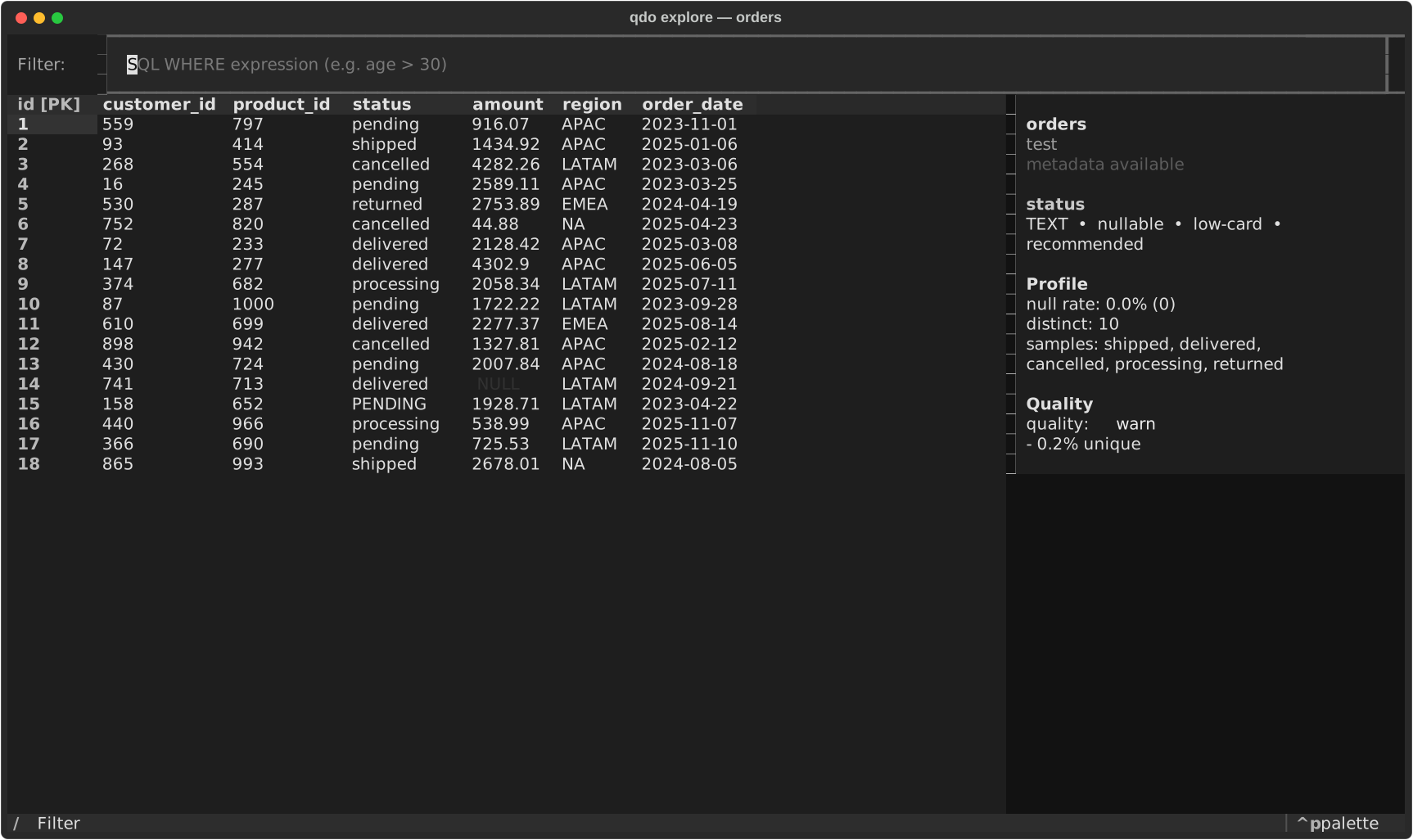
The main grid carries PK, sort, and null-heavy cues while the sidebar keeps the selected column's context visible.
Wide-Table Triage
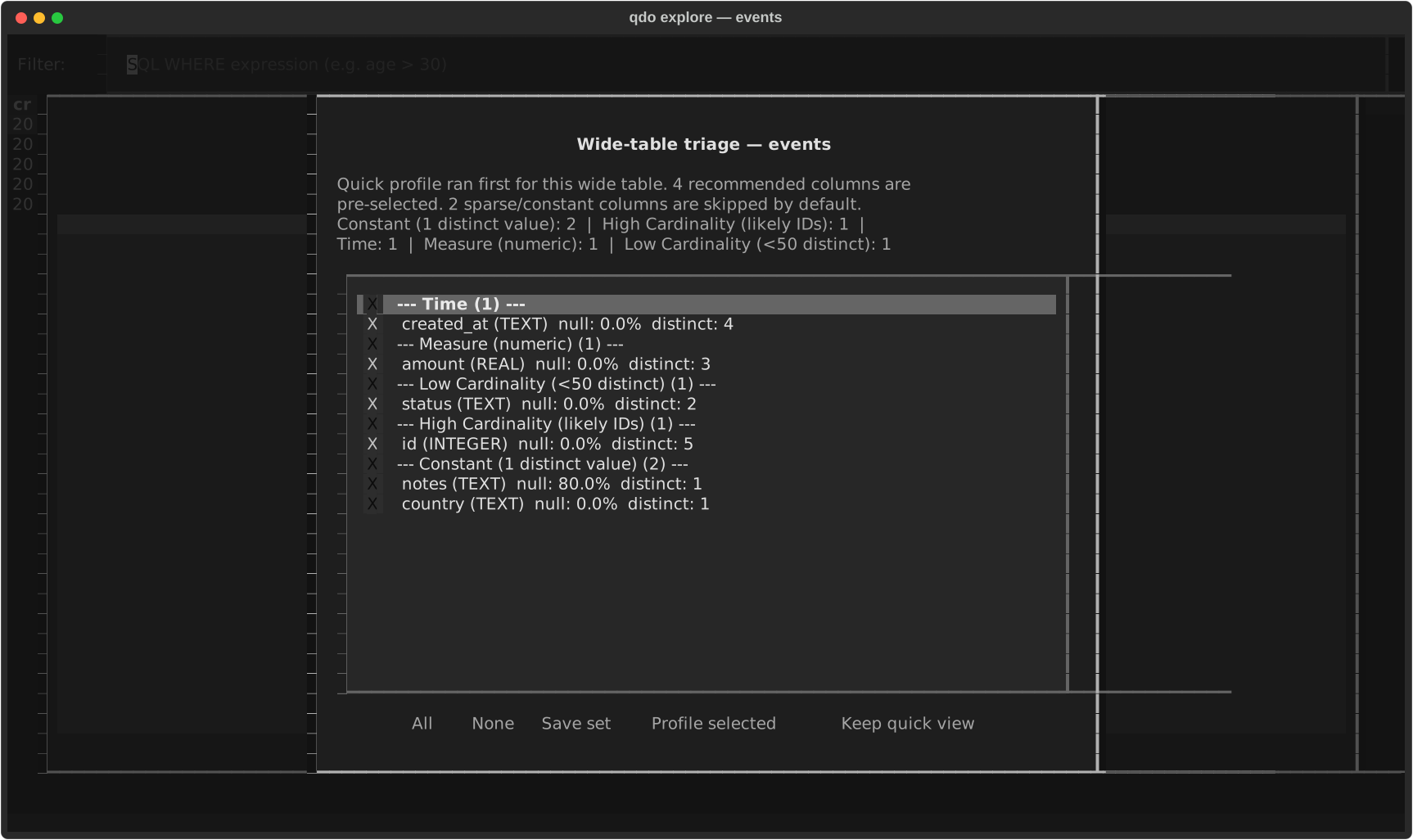
Wide tables switch into quick triage first, with recommended columns pre-selected and sparse or constant fields pushed out of the way.
Reproducible docs: These screenshots are generated from the test/demo databases with uv run python scripts/generate_tui_screenshots.py, so the cheatsheet stays in sync with the product.
Connection Resolution
-c my-named-connLookup in config file
-c data.duckdb.duckdb / .ddb → DuckDB
-c data.parquet.parquet → Parquet (via DuckDB)
-c data.dbAnything else → SQLite
Resolution order: 1) Named connection in config, 2) File path with extension-based type inference. Table and column names are case-insensitive — type in any case.
Common Workflows
Drill down after context leaves a gap
qdo context -t users -c mydbStart with combined context
qdo inspect -t users -c mydbSee columns & types
qdo preview -t users -c mydbEyeball sample rows
qdo profile -t users -c mydbStats + null counts
qdo dist -t users -col age -c mydbAge distribution
Pipeline: Add --format json to any command to pipe into jq for scripting.
Document a table
qdo template -t users -c mydbGenerate doc template
qdo inspect -t users -c mydb -vCheck existing comments
qdo sql ddl -t users -c mydbGet full CREATE TABLE
qdo sql scratch -t users -c mydbReproducible test fixture
Template auto-populates column stats & sample values, leaving <business_definition> placeholders to fill in.
Replay an investigation (experimental mode)
export QDO_EXPERIMENTAL=1Enable unstable session/workflow routes
qdo session show scratchReview recorded steps
qdo session replay scratchRerun into a fresh replay session
qdo session replay scratch --into rerunChoose the replay session name
qdo workflow from-session rerunCreate an experimental workflow draft
Replay reruns successful recorded steps in order. Add --last N to replay only the tail of a session.
Query & Export
qdo query -c CONN --sql "SQL"Run ad-hoc SQL
qdo query ... --file q.sqlSQL from file
echo "SQL" | qdo query -c CONNSQL from stdin
qdo query ... --from scratch:3Reuse SQL from a recorded query step
qdo query ... --limit 100Limit rows (default 1000)
qdo export -c CONN -t TABLE -o f.csvExport to CSV
qdo export ... --from scratch:last -o f.csvExport with saved query SQL
qdo export ... -e tsvExport to TSV
qdo export ... --clipboardCopy TSV to clipboard (Excel)
qdo explain -c CONN --sql "SQL"Query plan (EXPLAIN)
qdo explain ... --analyzeEXPLAIN ANALYZE (DuckDB)
Export formats: csv, tsv, json, jsonl. Use --clipboard for direct paste into Excel/Sheets. With QDO_SESSION enabled, --from SESSION:STEP reuses SQL from an earlier qdo query.
Quality & Analysis
qdo catalog -c CONNFull schema (all tables + columns)
qdo catalog ... --tables-onlyJust table names
qdo values -c CONN -t T -C COLAll distinct values
qdo values ... --max 50Limit distinct values
qdo query -c CONN --sql "select … group by …"GROUP BY aggregation
qdo quality -c CONN -t TABLENull/uniqueness per column
qdo quality ... --check-duplicates+ duplicate row check
qdo freshness -c CONN -t TABLETemporal column + recency
qdo assert -c CONN --sql "SQL" --expect 0Assert result (exit 0/1)
qdo joins -c CONN -t TABLEDiscover join keys
qdo diff -c CONN -t A --target BCompare schemas
Assert operators: --expect (==), --expect-gt, --expect-lt, --expect-gte, --expect-lte. Exit 0=pass, 1=fail.
Metadata Workflow
qdo values -c CONN -t TABLE -C COL --write-metadataCapture a small string enum
qdo metadata init -c CONN -t TABLEGenerate YAML template
qdo metadata show -c CONN -t TABLERead stored metadata
qdo metadata suggest -c CONN -t TABLE --applyApply deterministic additions
qdo metadata list -c CONNList files + completeness
qdo metadata edit -c CONN -t TABLEOpen in $EDITOR
qdo metadata refresh -c CONN -t TABLEUpdate stats, keep descriptions
qdo metadata undo -c CONN -t TABLERestore last qdo-managed snapshot
Storage: .qdo/metadata/<conn>/<table>.yaml — version-controlled with your project. Fill in descriptions, owner, PII flags, valid values. Use metadata undo to roll back the last qdo-managed write. Learn: qdo tutorial agent walks through the full enrichment → agent prompt workflow.
Setting Up a Coding Agent
1. Enable JSON mode
export QDO_FORMAT=jsonSupported scans/queries return envelopes
2. Get full context
qdo catalog -c mydbFull schema
qdo context -c mydb -t TSchema + stats + stored knowledge
3. Capture one verified fact
qdo values -c mydb -t T -C status --write-metadataPersist a small string enum
qdo metadata show -c mydb -t TBusiness context
4. Query & validate
qdo query -c mydb --sql "..."Run queries
qdo query -c mydb --from scratch:lastReuse recorded SQL
qdo assert -c mydb --sql "..." --expect NVerify results
Recommended agent workflow
1.qdo catalog → discover candidate tables
2.qdo context → understand one table
3.qdo values --write-metadata → capture a verified enum
4.qdo metadata show → read full business context if needed
5.qdo query → answer the question
6.qdo assert → validate assumptions
7.qdo report table / bundle export → hand off
Priority: explicit --format > QDO_FORMAT env > rich. Errors return structured JSON when format is json.
Integration files: integrations/skills/SKILL.md (provider-neutral) | integrations/continue/qdo.md (optional adapter) — add the appropriate file to your agent for full qdo knowledge.
Snowflake-Specific
qdo snowflake semantic -t TABLE -c CONNCREATE SEMANTIC VIEW DDL
qdo snowflake lineage --object FQN -c CONNGET_LINEAGE query
--direction upstreamTrace upstream lineage
--direction downstreamTrace downstream lineage
--domain tableTable-level lineage
--domain columnColumn-level lineage
--depth 5Traversal depth (default 5)
Semantic: Generates native semantic-view DDL from live Snowflake schema, comments, and sampled values for review before execution. Lineage: Requires Snowflake Enterprise Edition.
Backends: SQLite (built-in) | querido[duckdb] DuckDB + Parquet | querido[snowflake] Snowflake
querido[tui] Textual TUI | Python 3.12+